
Quick Start
These 5 steps will help get you started, but please be sure to read the interpretation tips below, and download our full documentation for important details.
- Gather Sequences
Sequences can be either nucleic or amino acids, from genomic, metagenomic, or amplicon sources, but must be in FASTA format.
Please avoid using non-standard characters (e.g. commas, slashes, colons, parentheses, ampersands, etc) in file names, identifiers, or sequences, as well as ambiguity codes "R" and "Y" for nucleic acid sequence files.
Genomic and Metagenomic file size limits are currently set at < 500,000 sequences or < 500 MB. For larger data sets (and faster analysis), please see our file size management page for ways to pre-filter cluster, and/or subdivide your data into smaller batches before submission.
Amplicon data queries are currently restricted to files with < 25,000 sequences. We are working on solutions to enable analysis of larger amplicon data sets, but do not yet have a projected availability date.
- Select Parameters
Go to the Run Analysis page.
Select KS or C domain (NaPDoS2 can only detect one domain type per analysis).
Select query sequence type: either amino acid or nucleic acid. (Nucleic acids will be automatically translated into all 6 reading frames.)
Choose a local sequence file to upload, or paste sequences into the window.
Advanced Settings can be used to adjust BLASTP stringency (default e-value = 1e-8) and minimum alignment (default length = 200aa/600nt). Caution: selecting less rigorous match criteria may decrease reliability of results.
- Run Analysis
Click SEEK, wait for JOB ID assignment.
Review the search parameters and estimated completion time displayed.
Click SUBMIT JOB to continue the analysis.
- Select Display Options
When the analysis is complete, a page will appear indicating how many domains were detected.
For nucleotide sequence queries: There is an option to DOWNLOAD a table listing the domain matches with their nucleotide coordinates and translation frames (see Documentation for interpretation of this table). Click CONTINUE ANALYSIS to display the Domain Classification Summary page.
For amino acid sequence queries, the Domain Classification Summary will be displayed immediately after analysis is complete.
You can view and download the results summary table, select specific classes/subclasses and VIEW A SUBSET of the results, or click VIEW ALL MATCHES to see complete Database Search Results.
Check out the interpretation tips below. Detailed information about the classification scheme can be found on the CLASSIFICATION web page and in the full Documentation .
- Download Results
From the Database Search Results page, sequences can be selected to View nucleotide coordinates for all trimmed domain candidates (nucleotide sequence queries only), Output selected sequences in fasta format, or Output Alignment of your query sequences to the top database hits.
All result tables can be downloaded using the DOWNLOAD button (click to view, right click to save).
Click on domain class or BGC match links to learn more about related domain categories and biosynthetic gene clusters in the NaPDoS2 database.
If results include < 100 KS or C domains, selected sequences can also be viewed in phylogenetic context relative to functionally characterized reference domains (Construct Tree), and downloaded as an SVG image or in Newick tree format.
The 100 domain tree-building limit has been set due to computational resource limitations. If more than 100 domains are detected initially, tree construction can be enabled by re-running the analysis using a smaller subset of the original sequences.
If you find NaPDoS to be useful for your work, please cite:
Interpreting Results
BLASTP tophit category
|
BLAST matches to reference domain sequences provide a good starting point
for predicting domain functionality, but are less
reliable than multiple sequence alignments
and the phylogentic trees built from them. This is because BLAST scores
represent average, overall similarities distributed over the entire domain, considering
only two sequences at a time, whereas multiple sequence alignments and tree topologies
combine information from many sequences together to reveal relationships based on
more specific, potentially localized features they may have in common.
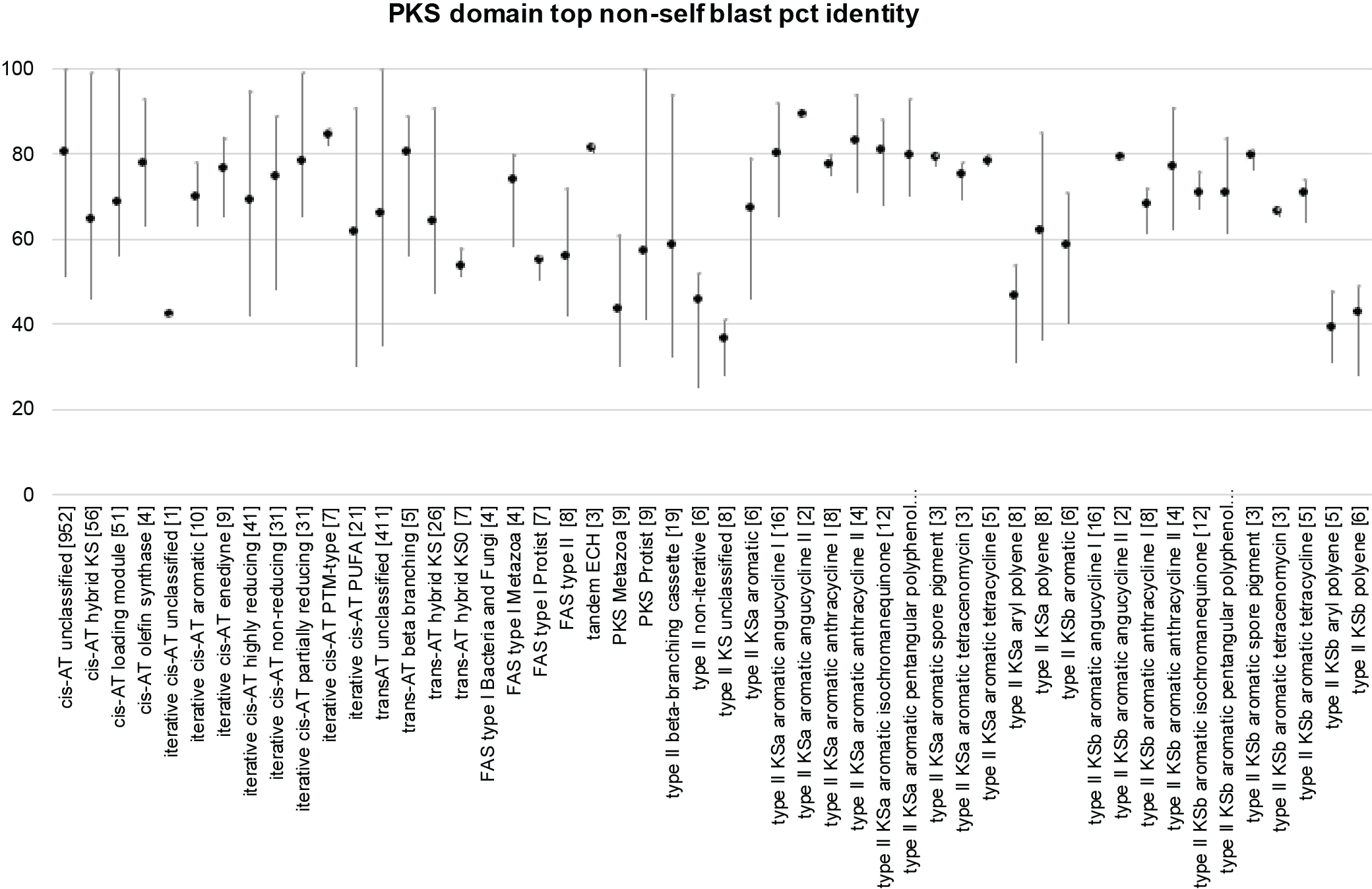
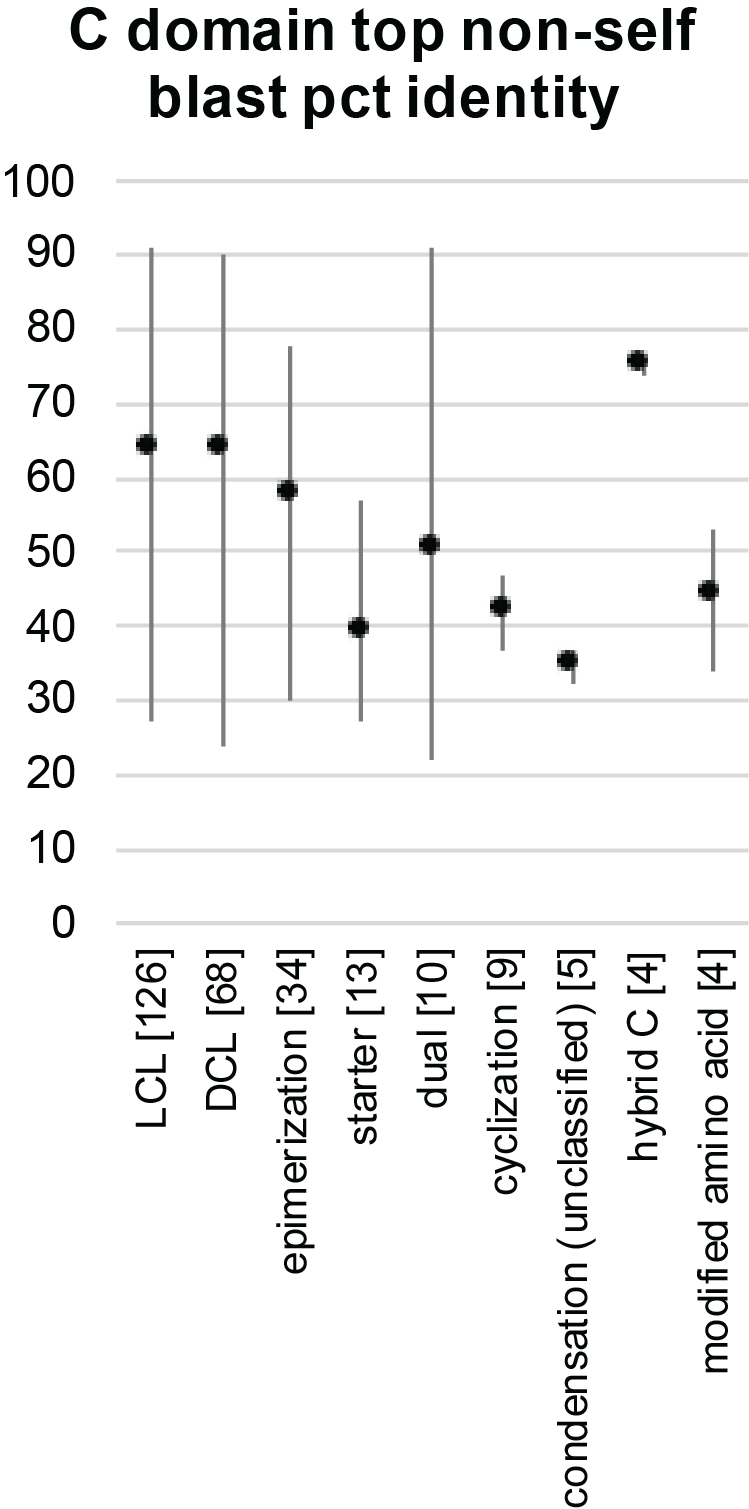
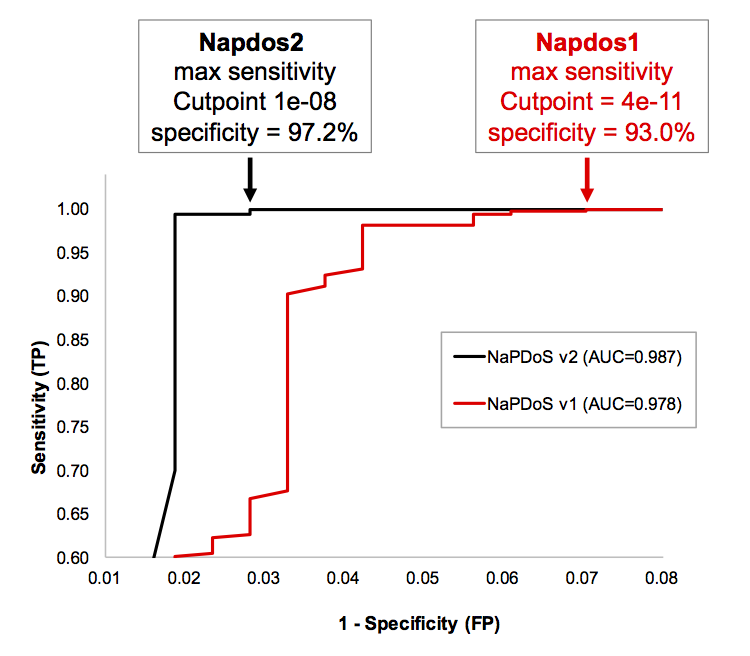
Typical amino acid percent identities vary widely within different functional domain categories, due at least partly to variability in the number and diversity of reference examples available. The following chart of leave-one-out (jack-knife) cross validation scores, shows averages and expected ranges for members of different functional classes. These values were obtained by finding the closest, non-self database match for each NaPDoS2 reference domain, and comparing amino acid match statistics to other members of the same functional classification category. Brackets after each category on the x-axis indicate the number of database reference sequences analyzed for that category. These results provide the current sequence identity ranges within each class and subclass. |
|
|
|
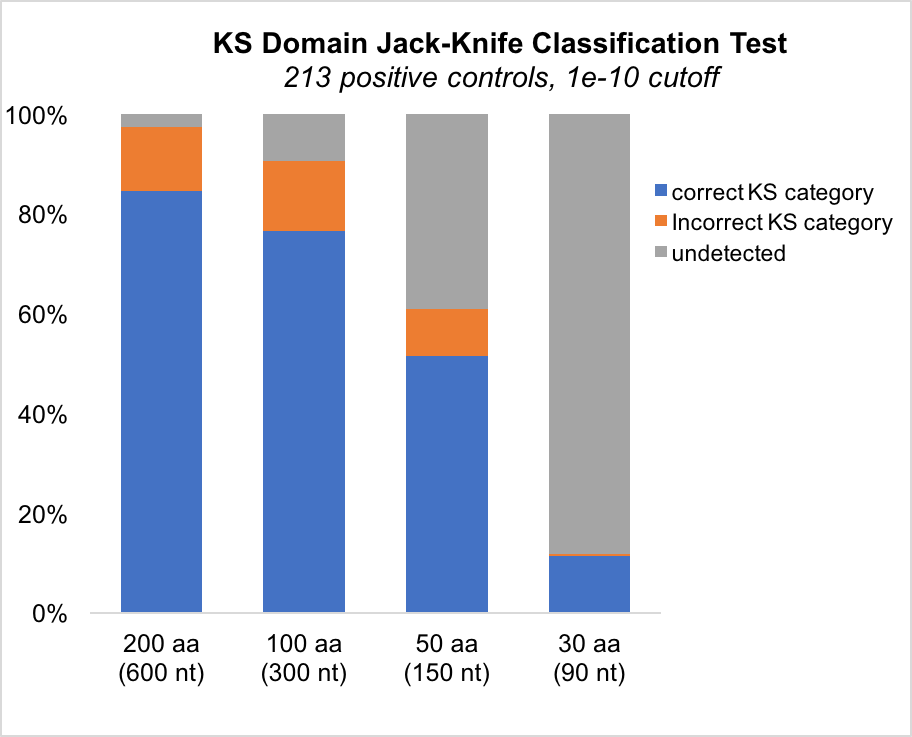
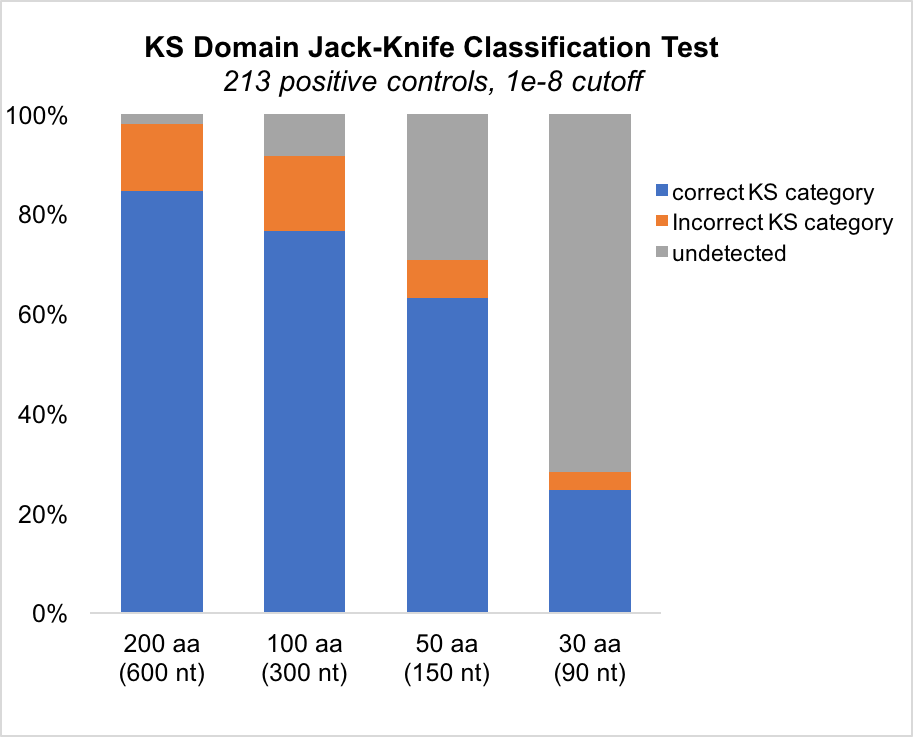
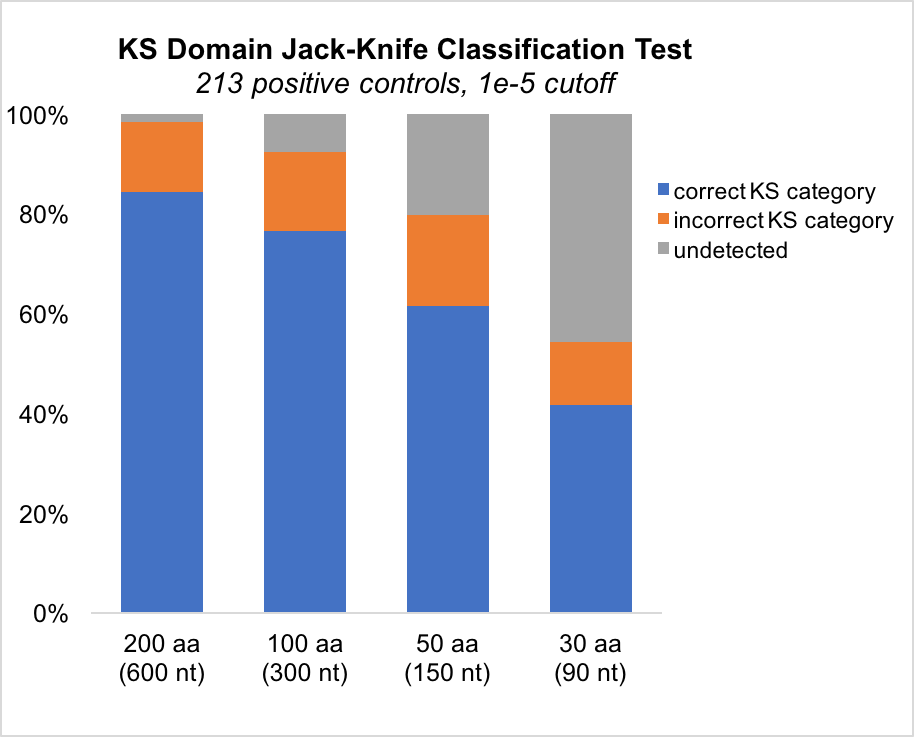
Large declines in sensitivity and classification accuracy were observed when full-length, non-redundant positive control domains were split into smaller, overlapping subsequences of less than 100 amino acids (300 nucleotides), as shown below. Relatively novel domain classes, with fewer available reference examples, were the ones most likely to be mis-classified in leave-one-out cross validation tests. Sensitivity declines can be partially offset by decreasing BLAST stringency, but this adjustment may also increase false positives and mis-classifications, depending on the nature of the data being analyzed. |
|
|
|